I Replaced My LG TV’s Home Screen
For most of its life, I treated my TV like a display.
A sophisticated one, sure. It had Wi-Fi, apps, voice controls, advertisements, recommendations, analytics, and an operating system underneath it all.
But mentally, it was still a television.
Then I watched a Gamers Nexus investigation, "216,000,000 Spy TVs | The LG Smart TV Problem".
The investigation covered LG's data collection and advertising stack, including Automatic Content Recognition, network and device discovery, telemetry, and voice-related behavior.
The realization was horrific: this wasn't just a TV anymore. It was a spying device hanging on my wall. I knew I had to do something.
So I started looking into ways to hack it, and that's when I found this awesome homebrew community project called RootMyTV. What surprised me was how straightforward the process could be on a vulnerable TV: be on the same network, open the exploit on the TV, and gain root access. The fact that this was possible from the local network was itself somewhat concerning, considering how much personal data a smart TV can potentially have access to.
Anyhow, once I had root access, I started stripping things back:
- Telemetry
- Tracking-related services where practical
- Home-screen advertisements
- Applications I didn't use
- General bloat
Then I picked up the remote, pressed Home...
...and got LG Home.
That was the point where this project actually started.
I had taken control of a lot of what the TV was doing underneath, but the thing I interacted with every day was still someone else's idea of what my television should look like.
I didn't want another dashboard.
I didn't want a different recommendation engine.
I wanted the Home button to show:
- my apps,
- my inputs,
- a clock,
- Settings,
- and almost nothing else.
That became Minimal Home.
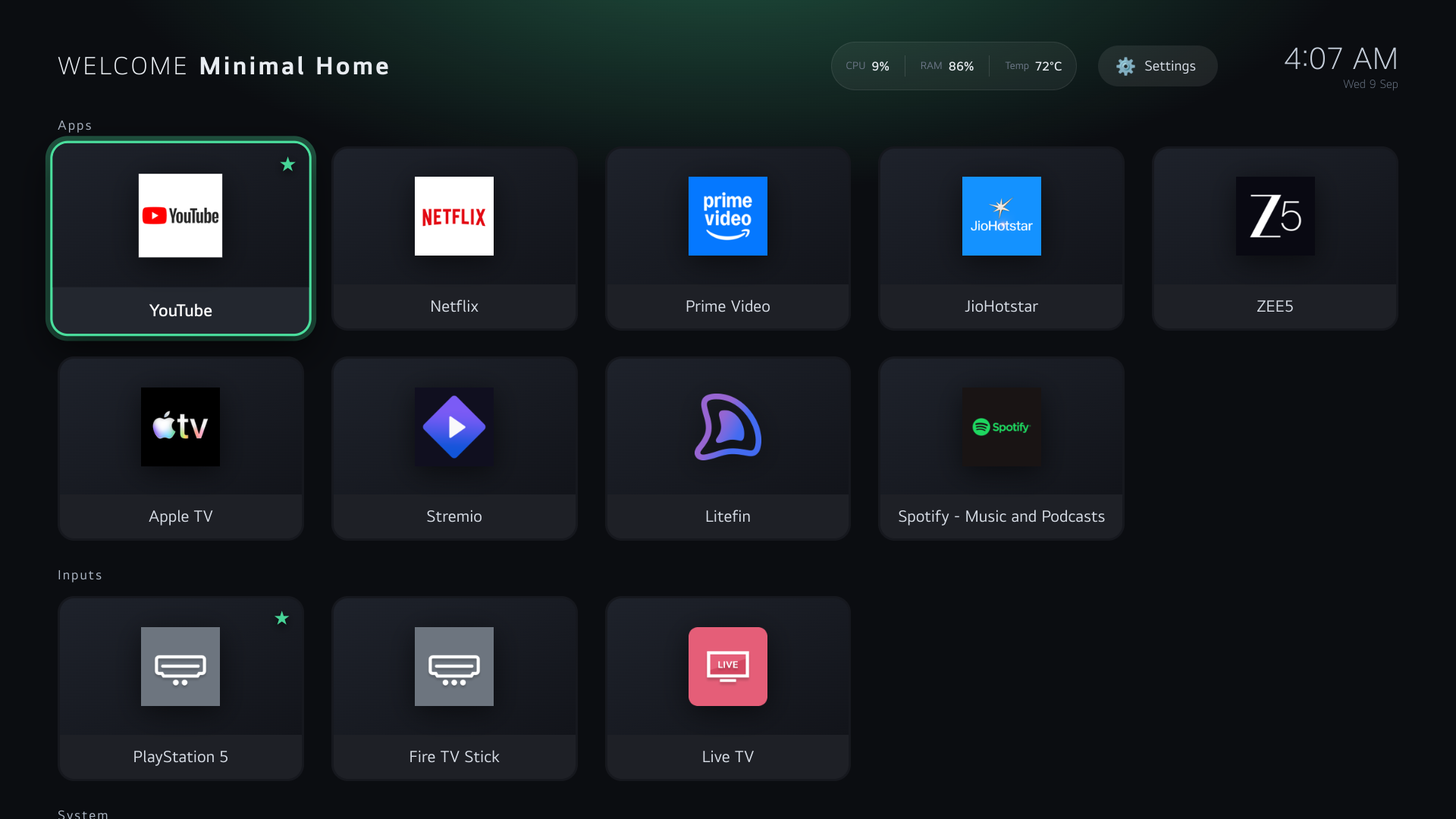
The interface stayed simple.
The implementation underneath became significantly less simple.
Replace the layer, not the operating system
The first useful constraint was that I didn't want to replace webOS.
I still wanted LG's application manager, HDMI switching, CEC, audio, picture controls, streaming apps, and all the boring hardware integration that already worked.
Minimal Home therefore does not root the TV and does not replace the firmware.
It assumes a rooted TV with SSH access and the necessary Luna permissions already in place.
The visible launcher is a normal webOS web app:
The frontend is plain HTML, CSS, and JavaScript. The main TV-specific UI concern is deterministic focus navigation with a D-pad, Back, OK, long-press actions, overlays, and search.
I won't spend much time on that part. It is mostly standard frontend state and focus management adapted to a ten-foot UI.
The more interesting problem was discovering what should actually appear on screen.
Let webOS describe the TV
I didn't want the launcher to contain a hardcoded copy of my TV's installed applications.
webOS already exposes launch points through Luna, so the relay in launcher-service/service.js calls:
com.webos.applicationManager/listLaunchPointsThe returned launch points are classified into normal applications, inputs, and explicitly allowed system apps.
Input handling deserves a little care because HDMI/bookmark launch points can carry parameters such as physical addresses and port metadata. Those are preserved rather than reconstructed.
The validation, input classification, preferences, launch-parameter normalization, and sorting logic live in launcher-service/model.js.
So the runtime path is basically:
flowchart LR
    UI["Minimal Home"] -->|"getTiles"| Relay["Node relay"]
    Relay -->|"listLaunchPoints"| Luna["webOS Application Manager"]
    Luna -->|"Apps + inputs + metadata"| Relay
    Relay -->|"Classified + sorted tiles"| UI
That means the launcher follows the actual TV.
Install an app, remove one, reconnect an input: no rebuild required.
At this point I had a useful launcher.
I still didn't have a replacement Home screen.
The Home button was the interesting part
My first instinct was to find a way to remap or intercept the physical Home button.
I wasn't able to do that cleanly.
What I could observe, however, was the effect of pressing it:
LG Home became the foreground application.
That turned out to be enough.
launcher-service/watcher.js runs as a separate root process and subscribes to:
com.webos.applicationManager/getForegroundAppInfoWhen the foreground application becomes:
com.webos.app.homethe watcher launches:
org.minimal.homeSo the Home button still technically opens LG Home.
Minimal Home just follows immediately after.
flowchart LR
    A["Home button"] --> B["LG Home foreground"]
    B --> C["Foreground subscription"]
    C --> D["watcher.js"]
    D -->|"LG Home detected"| E["Launch org.minimal.home"]
That implementation detail ended up defining the project.
Minimal Home doesn't replace LG Home at the firmware level.
It observes the transition and redirects at the application layer.
The detection is event-driven rather than polling, with reconnect handling and bounded retry behavior if the subscription or launch fails.
Of course I needed an escape hatch
Once Home redirection worked, I had created another problem: how do I deliberately open LG Home?
Minimal Home includes an LG Home tile.
The relay writes a short-lived .noredirect expiry and launches stock Home. The watcher checks the bypass before redirecting.
If launching LG Home fails, the bypass is removed immediately.
The implementation lives in service.js, and the recovery path is documented in docs/INSTALL.md.
That mattered to me from the start.
If custom software takes over the Home experience, returning to stock shouldn't require reverse-engineering your own setup six months later.
Then the webview couldn't load the icons
listLaunchPoints gives me application icon paths.
The webview cannot freely consume arbitrary absolute filesystem paths elsewhere on the TV.
So the launcher knew exactly where an icon was and still couldn't render it.
The root watcher ended up solving that too.
It periodically discovers launch points, copies usable icons into the application's own directory, and the frontend loads relative paths from there.
flowchart LR
    A["System icon"] --> B["Root watcher"]
    B --> C["launcher-app/icons/"]
    C --> D["webOS webview"]
The interesting part isn't the copying itself, but the failure semantics.
The watcher avoids rewriting identical bytes, bounds file sizes, tries alternate icon candidates, keeps last-known-good files on transient errors, and only prunes stale cache entries after successful discovery.
That became a general rule for the project:
Failed refreshes should not destroy known-good state.
webOS service boundaries changed the build
The next webOS-specific constraint came from the Node service jail.
I originally expected the frontend and relay to consume the same application-side configuration file.
On my device, the jailed relay couldn't reliably read from the app directory.
So the service needed its own copy.
I did not want two manually maintained configuration files.
build_launcher.py became the build boundary.
The source configuration is:
and the build generates:
The build also embeds the shared model code used by the frontend.
flowchart TD
    SRC["launcher-app/src/"] --> BUILD["build_launcher.py"]
    CFG["launcher-app/config.json"] --> BUILD
    MODEL["launcher-service/model.js"] --> BUILD

    BUILD --> HTML["launcher-app/index.html"]
    BUILD --> MANIFEST["launcher-app/appinfo.json"]
    BUILD --> SCFG["launcher-service/config.json"]
CI runs:
python build_launcher.py --checkto catch drift between sources and generated files.
A production build also deliberately contains no personal app list.
Live tiles come from the TV at runtime.
Sample data only gets baked into explicit preview builds:
python build_launcher.py --previewThat lets the public repository remain generic while still supporting desktop development.
The UI accumulated just enough state
I didn't want to remove LG's recommendation system and then accidentally build my own.
So app ordering is intentionally simple.
The relay maintains usage.json as a relative recency sequence, not launch frequency.
Minimal Home combines that with:
- pinned apps,
- hidden apps,
- explicit priority entries,
- alphabetical fallback.
Preferences are stored in prefs.json.
The temporary stock-Home bypass lives in .noredirect.
Writes use launcher-service/storage.js and are done using temporary files plus rename rather than rewriting JSON in place.
The UI exposes pin/hide actions through a per-app menu:
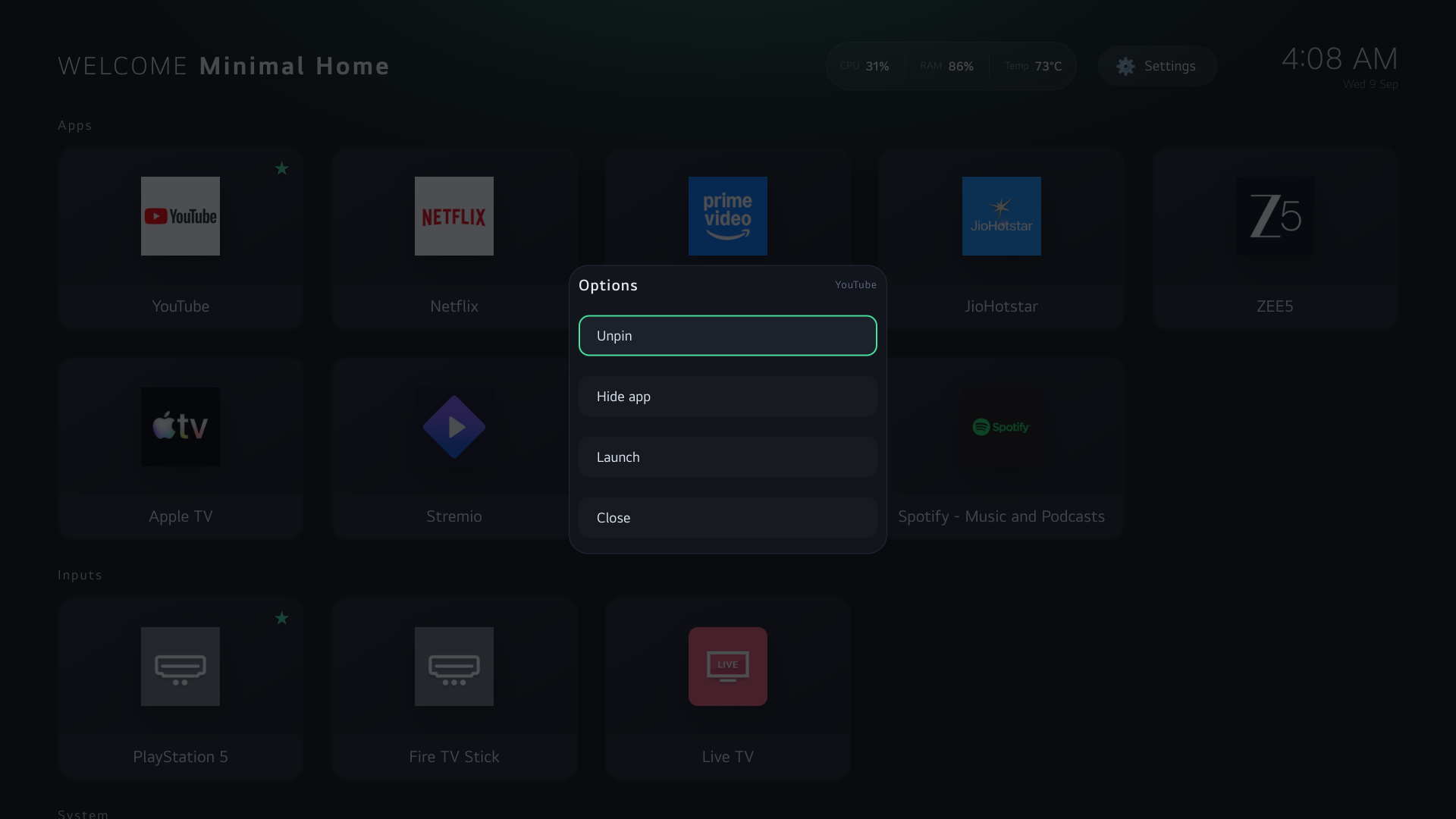
There is also a simple search view:
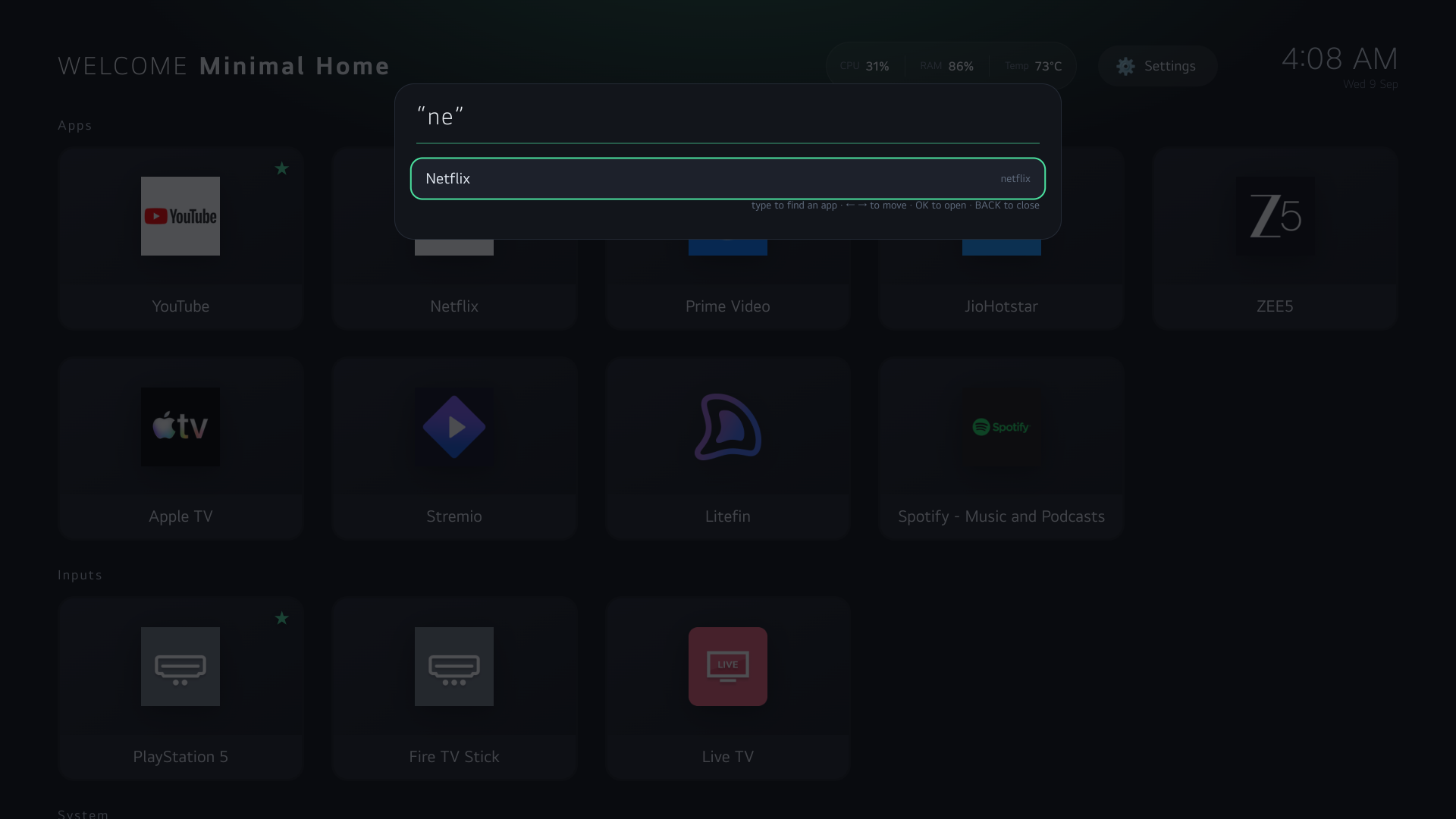
And launcher preferences are configurable from the TV itself:
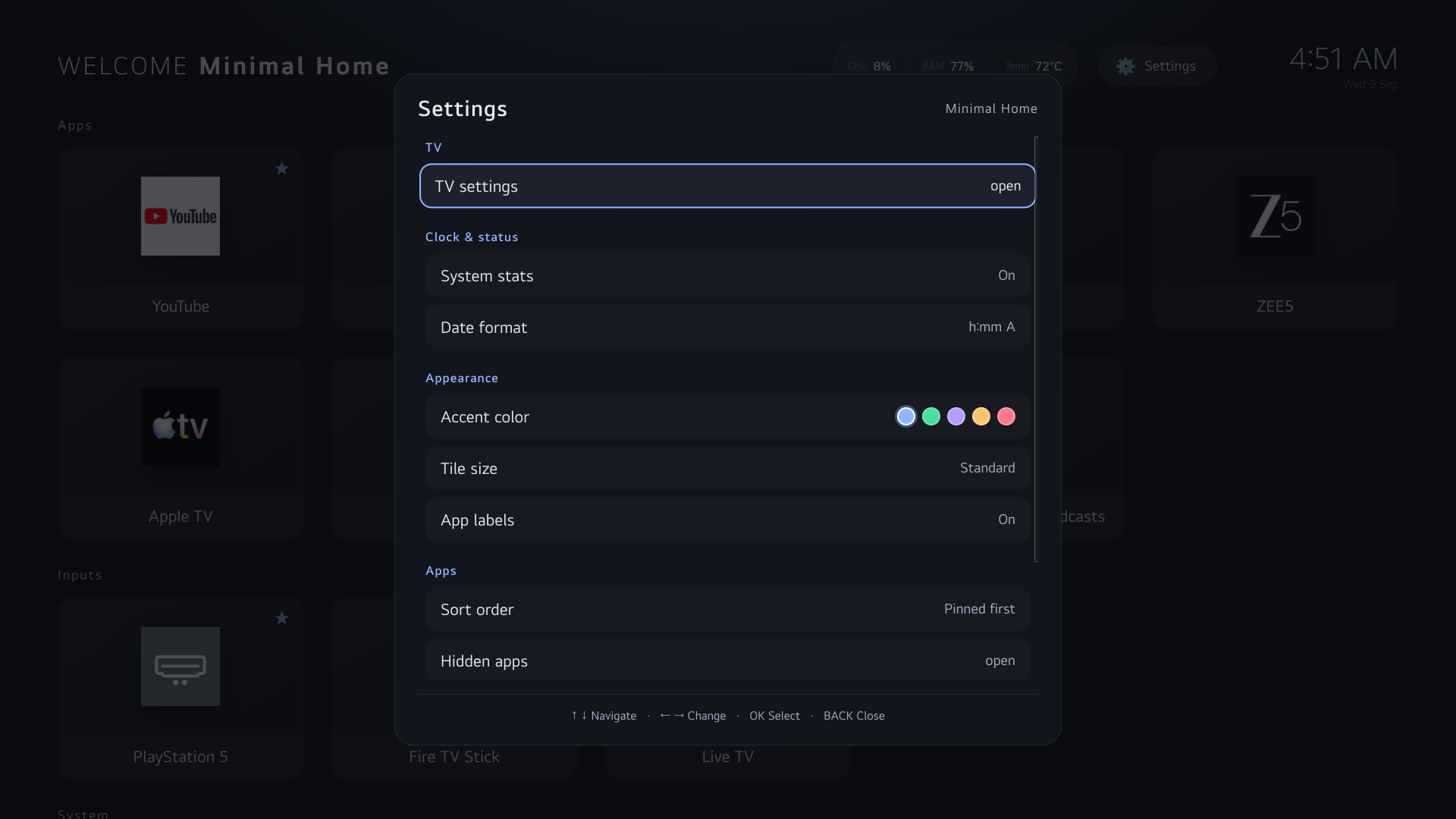
That is roughly the level of personalization I wanted.
Useful state, but no content-ranking system.
Since the watcher was root anyway...
The watcher already had access to /proc and /sys, so I added optional CPU, RAM, and temperature statistics.
and no, the Home screen does not need these necessarily but it's a nice addition.
The more useful architectural point is that the privilege boundary stays narrow.
flowchart LR
    PROC["/proc + /sys"] --> WATCHER["Root watcher"]
    WATCHER --> SNAPSHOT["Stats snapshot"]
    SNAPSHOT --> RELAY["Luna relay"]
    RELAY --> UI["Frontend"]
The frontend doesn't gain arbitrary filesystem access, and the relay doesn't run as root.
The privileged process reads the system state and exposes only the small data model the UI needs.
The architecture that emerged
By this point Minimal Home had settled into three runtime components.
flowchart TB
    LUNA["webOS Application Manager / Luna"]

    UI["Minimal Home webview"]
    RELAY["Node relay<br/>service.js"]
    WATCHER["Root watcher<br/>watcher.js"]
    STATE["prefs.json<br/>usage.json<br/>.noredirect"]
    SYSTEM["/proc + /sys"]

    UI <-->|"Luna RPC"| RELAY
    RELAY <-->|"Discovery + launches"| LUNA
    WATCHER <-->|"Foreground subscription"| LUNA

    RELAY <-->|"Persistent state"| STATE
    SYSTEM --> WATCHER
    WATCHER -->|"Icons + stats"| UI

    WATCHER -->|"LG Home detected"| LUNA
The frontend owns rendering and interaction.
The relay owns the narrow webOS API surface needed by the frontend.
The watcher owns privileged and long-lived behavior.
This wasn't a grand upfront design. It was mostly the architecture that fell out of webOS's process and filesystem constraints.
The details are documented in docs/ARCHITECTURE.md.
webOS has a few lifecycle surprises
There were some platform-specific behaviors worth calling out.
On the webOS version I tested, a foreground webview can still report:
document.hidden === trueso foreground handling also considers document.hasFocus().
Background webviews may be purged, which means the launcher treats foreground return as a real refresh boundary rather than assuming its in-memory state survived another application.
The physical Exit button also isn't something the frontend can reliably intercept. Recovery again happens through the foreground watcher: if stock Home appears, Minimal Home can redirect back.
This was the point where watcher.js stopped feeling like a Home-button workaround and became part of the actual runtime model.
The hard part became failure handling
The happy path is trivial:
Home
  ↓
Minimal Home
  ↓
Netflix
Most of the interesting code handles everything around that.
Luna calls have deadlines and single-completion guards.
Foreground subscriptions reconnect.
Redirects have cooldowns and bounded backoff.
A confirmed transition away from Home clears stale redirect state.
Failed app discovery keeps the previous successful tile set.
Unchanged discovery preserves existing DOM and focus.
Failed icon refreshes keep working cached assets.
Preference writes are serialized.
The project isn't doing anything algorithmically exciting.
It's mostly making many small conservative choices around state and failure.
That is also what made me comfortable enough to let it take over the Home button.
Updates needed the same philosophy
Updating a rooted TV should be boring.
The installer preserves runtime state such as preferences, usage history, icons, and existing local configuration.
Config updates are merged rather than replaced outright:
flowchart TD
    OLD["Installed config"] --> VALIDATE{"Valid?"}
    VALIDATE -- No --> ABORT["Abort before modifying TV"]
    VALIDATE -- Yes --> MERGE["Merge custom values<br/>onto new schema"]
    NEW["New release config"] --> MERGE
    MERGE --> UPLOAD["Upload"]
The installer intentionally does not root the TV, broadly modify Luna permissions, or silently create persistent boot integration.
Those steps are firmware-dependent and have much larger failure domains than updating the launcher itself.
The installation and recovery path is in docs/INSTALL.md.
Most of it can be tested without the TV
Despite being very platform-specific, most of the code sits behind clean enough boundaries to test off-device.
Python tests cover build/config/package behavior.
Node VM tests exercise the relay and watcher with mocked platform APIs.
jsdom runs the actual frontend against its DOM.
CI covers generated-file drift, formatting, linting, syntax, regression tests, coverage, packaging, and shell checks.
The full boundary is described in docs/TESTING.md.
Of course, desktop tests cannot prove:
- Luna registration works on another firmware,
- another service jail behaves identically,
- HDMI really switches,
- a physical remote emits the expected events,
- another LG model exposes the same quirks.
For the v1.4.2 release, I tested the release candidate on an LG 43UR7500PSC running firmware 33.31.61 and exercised the primary SSH and Luna paths there.
That's device evidence.
It is not a compatibility matrix.
I started this because I wanted the TV to do less
That's the slightly ironic part.
The project exists because I wanted less software in front of me.
First less telemetry.
Then less tracking.
Less advertising.
Less bloat.
Eventually, less interface.
The product requirement stayed tiny:
show apps
show inputs
launch them
get out of the way
But making that boring experience reliable required working through webOS lifecycle behavior, Luna RPC, service isolation, foreground subscriptions, local persistence, root filesystem access, app metadata, caching, update safety, and recovery.
Most of that complexity should be invisible when I pick up the remote.
I should just see my applications.
The Gamers Nexus investigation was what sent me down this path in the first place.
It made me stop thinking of the TV as an appliance with some software inside it and start thinking of it as a computer on my network with a large display attached.
From there, rooting it felt less unusual.
Disabling services felt less unusual.
And replacing the launcher felt like the natural last step.
The original question was:
How do I replace LG Home?
That sounds like a firmware project.
But I didn't need to replace webOS or even truly replace LG Home.
I needed to:
- discover apps,
- launch them,
- discover inputs,
- observe when Home appeared,
- render my own UI,
- and retain a safe path back.
webOS already exposed almost all of those primitives.
The rest fit into one small privileged process.
So in the end I didn't replace very much.
I replaced the smallest layer I no longer wanted.
And after all of that, pressing Home now does exactly what I wanted at the beginning:
it shows me my apps.
The TV didn’t become less smart. It just became more mine.